


Tips to Get the Most from the 2021 Annual Virtual Conference
Use this blog to prepare for this year's 2021 Share My Lesson Virtual Conference and have everything you need before we kick this year's event off!

Share
March 17, 2021
Use this blog to prepare for this year's 2021 Share My Lesson Virtual Conference and have everything you need before we kick this year's event off!
Share
Virtual Conference Tips: Get the Most Out of Your Session(s)!
From all of us on the Share My Lesson team, we want to thank you for your interest in the 2021 Virtual Conference! We’re now six days away from our official launch, and we want to make sure you’re equipped with everything you need to know before logging in for your first, second, or even ninth time with us! ?
We’ve been going virtual with our free, premium content even before the world threw a curve ball at society, and this year is no exception with 40+ webinars from the most noteworthy organizations and leaders in education.
So before we kick off day one of the conference next week, take a quick look at the tips I’ve listed below on how you can get the most out of your experience.
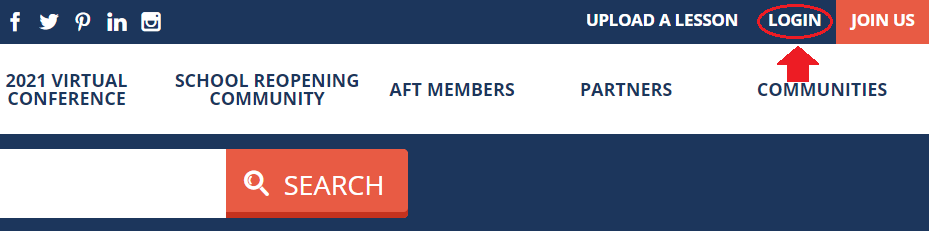
Important stuff first: Log in to Share My Lesson
Our partners and presenters have rich (and free) resources to share with all registrants at the Virtual Conference. We’ll be posting the PowerPoints and handouts for downloading, so remember to log in to get the most out of attending!
Update your profile and say hello!
Did you know you can pick an avatar if you don’t want to add your own photo?
Personally, one of my favorite animals is a fox, so if I’m feeling like I’d rather have an animated avatar instead of my real-life headshot, I can choose the fox avatar or one of the other dozens of options we offer (see below).


After you’re all updated, if you haven’t yet, join the 2021 Virtual Conference Community and introduce yourself. Let everyone know what content you’re interested in, what you’re hoping to get out of this year's sessions, and which ones you’re signing up for. Engage with the Share My Lesson Community and share your ideas and passions!

Engage with us online
Are you on Twitter? We’ll be live-tweeting the event again this year. Be sure to follow us here: https://twitter.com/sharemylesson and help us get the word out on all this free content. You can even use this ready-to-share tweet.
Check out the other ways you can connect with us on social media





The early bird catches the worm
You can log in to any Virtual Conference webinar up to 15 minutes before it starts. You can use this time to grab a cup of coffee (or tea), but we hope you also will introduce yourself to your fellow participants and panelists and let everyone know what you’re excited about. Our webinars have very active audiences, and people want to know your thoughts! View the image below to see where you can access the chat box.

Better together
Time after time, webinar attendees have told us the best way to get the most out of their session is to invite a friend or colleague. You can share ideas and takeaways, and help one another implement new practices when you’re back at school.
Am I hearing things?
We all know that technology can be difficult to deal with these days, so here are some tips to help you sort out any problems that might arise during your experience:
‘I had an important phone call, and I missed the webinar!’
No worries! Every Share My Lesson webinar is available on demand after the initial broadcast concludes. If you’re feeling like going on a deep dive, you can choose from hundreds of webinars in our catalog spanning a rich array of subjects and topics. You can check out the sessions from last year’s conference here. And be sure to check out our main webinars homepage.
‘Esta presentación está en inglés, pero yo prefiero el español.’
¡No te preocupes! Cada sesión tendrá subtítulos en español después de la transmisión inicial.
Connect with new colleagues
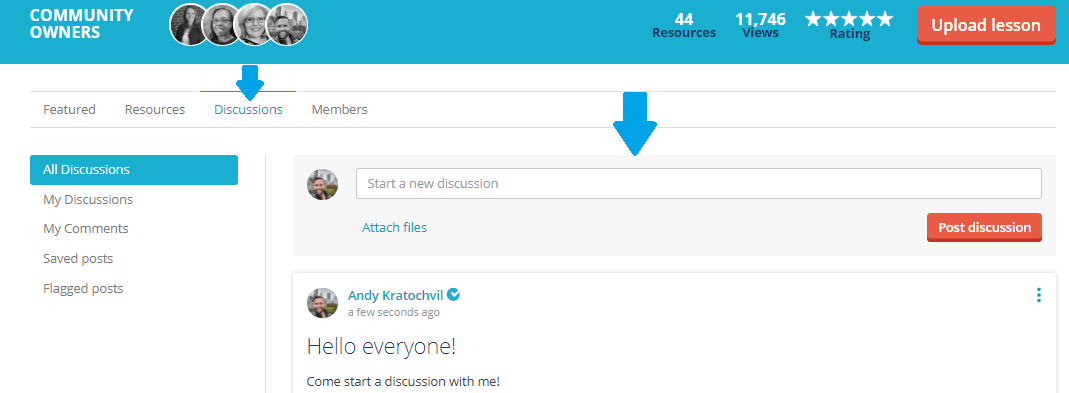
Before, during, or after the webinar, you can head on over to our 2021 Virtual Conference Community and kick off a discussion on what you’re excited about, what you learned, or how you plan to use the information from your session.
Rate your experience
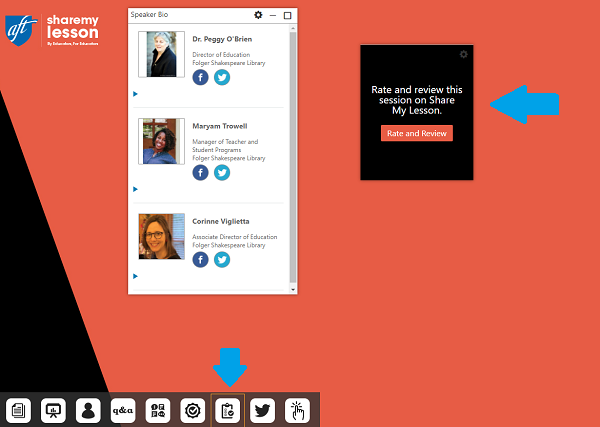
Share My Lesson is nothing without our passionate community, and we want to hear from you! After each webinar, rate your experience on our survey so we know what worked (and what didn’t). This information helps us stay on top of what educators, school staff and parents find most relevant, and lets us know how we can improve for the next year.
‘Wait, how does professional development credit work again?’
We all know how important the certificate is at the end of the session. Make sure to read this brief explanation of how PD credit works on Share My Lesson, and about our new CTLE credits for those of you in New York state.
The content that keeps coming
If you haven’t heard yet, we’ve added some new webinars to this year’s lineup. Check out and register for our newest Virtual Conference webinars with Nickelodeon/Noggin and U.S. Secretary of Education Miguel Cardona.
Each year, the Share My Lesson Virtual Conference is a place where thousands of educators, school staff and parents convene to learn more about what is driving today’s education trends, how we can better serve our respective communities and students, and how to take care of ourselves. We hope you found these tips useful for your planning, and we can’t wait to meet you next week!